
AspireC4
An Aspire extension library that auto-generates live LikeC4 architecture diagrams from the Aspire resource graph. Diagrams update in real-time as resources start, stop, or produce errors — with each element linking back to the Aspire dashboard.
 GitHub
  NuGet
NuGet  Aspire
  LikeC4
 AspireC4 is an extension library for the Aspire framework that generates live C4 architecture diagrams using LikeC4.
It provides real-time visualizations of your system’s architecture, automatically updating as resources change state. Each element in the diagram links back to the Aspire dashboard for easy navigation and monitoring.
You can find the source code and installation instructions on the GitHub repository and the package is available on NuGet.
For more information on LikeC4, visit the LikeC4 website.
All of this was made possible by the excellent hard work of the Aspire and LikeC4 teams, and the rest of the open-source community. AspireC4 is licensed under the MIT License, allowing you to freely use, modify, and distribute it in your projects.
Examples
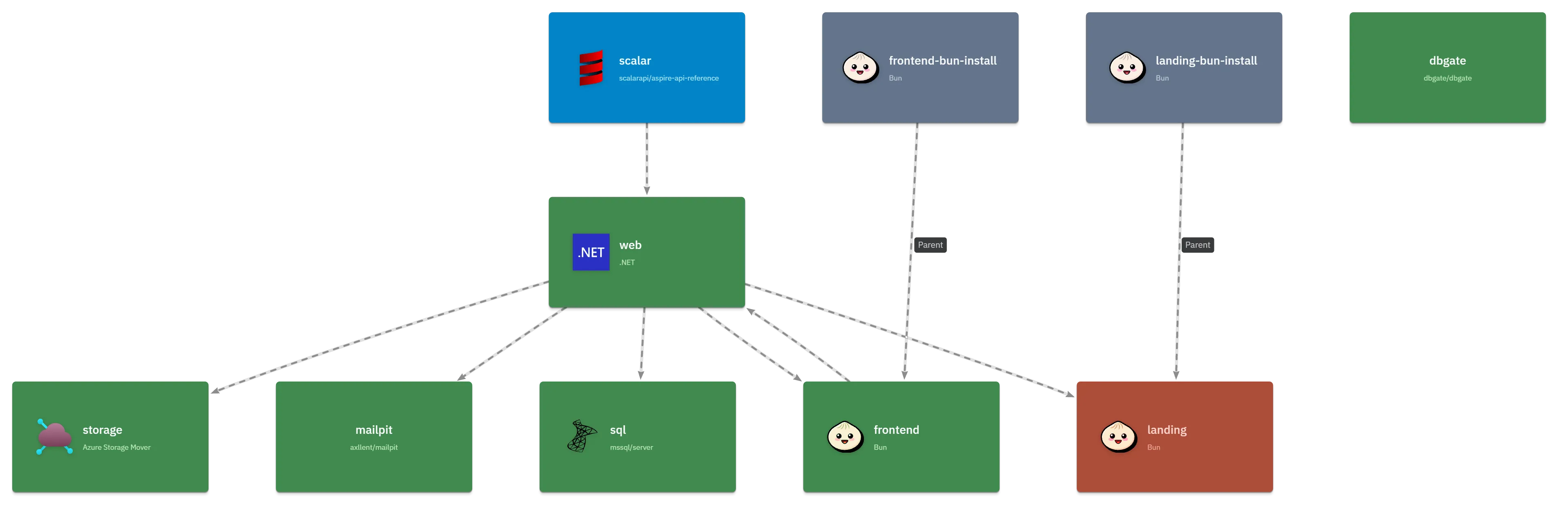
Here is a basic example of AspireC4 in action, showing a live architecture diagram generated from an Aspire resource graph using only the builder.AddAspireC4() extension method:
With a few additional configuration options, you can customize the diagram’s appearance and behaviour:
 var builder = DistributedApplication.CreateBuilder(args); builder.AddAspireC4(opts => {   opts.Title = "MakerStack Architecture"; });
 // ...add other projects/resources such as databases, services, etc. builder   .AddNodeApp("frontend", "../../frontend")   .WithLikeC4Details(opts => {     opts       .WithLabel("MakerStack React SPA")       .WithIcon("tech:react")       ... etc   });
 builder   .AddProject<Projects.Web>("web")   .WithLikeC4Details(opts => {     opts       .WithLabel("Web Host")       .WithSummary(".NET 10/ ASP.NET Minimal API web app. Hosting APIs, and the Astro-based landing site and the MarkerStack SPA");   })   # Note the reference to the database project here, to save you from calling .WithReference(db) as well..   .WithLikeC4Reference(db, opts => {     opts       .WithLabel("Tabular Data Stream (TDS)")       ... etc   });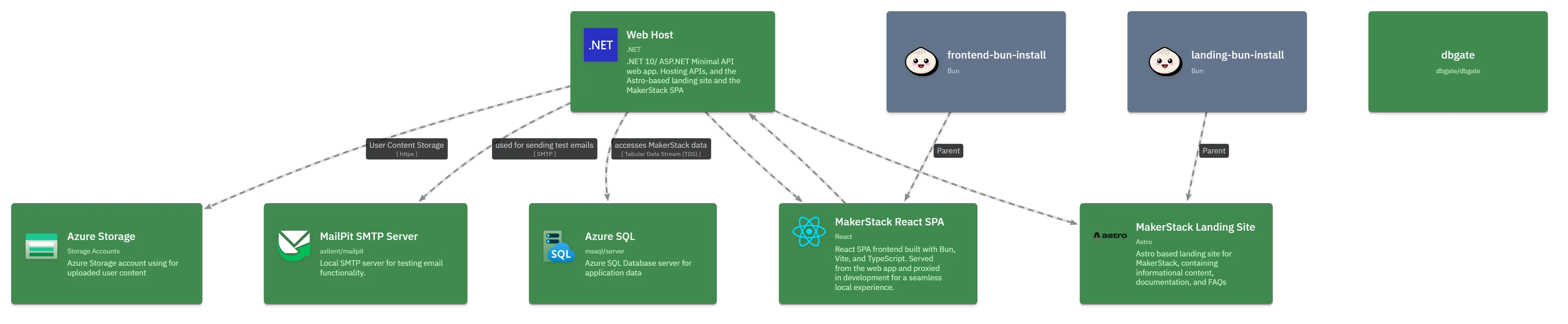
AspireC4.Hosting
AspireC4.Hosting is an Aspire extension library that auto-generates live LikeC4 architecture diagrams from the Aspire resource graph. Diagrams update in real-time as resources start, stop, or produce errors — and each element links back to the corresponding Aspire dashboard page.
Prerequisites
- Docker (required by default) — the LikeC4 server runs as a
ghcr.io/likec4/likec4container sidecar. - Alternatively, use
.WithLocalCLI()to run via a locally-installed Node.js CLI (npx,pnpm,yarn,bun, ordeno).
Quick start
var builder = DistributedApplication.CreateBuilder(args);
// Add your services ...var api = builder.AddProject<Projects.MyApi>("my-api");
// Register the LikeC4 visualization sidecar.builder.AddAspireC4();
builder.Build().Run();
This:
- Writes a
./likec4/model.gen.c4file from the Aspire resource graph. - Starts a
ghcr.io/likec4/likec4Docker container serving the live diagram. - Watches for resource state changes and regenerates the file automatically.
How it works
Data flow
Aspire resources │ ▼LikeC4ModelBuilder.Build() ← resource states, dashboard URL │ ▼LikeC4DSLGenerator.Generate() │ ▼./likec4/model.gen.c4 ← written to disk (and Docker volume) │ ▼ghcr.io/likec4/likec4 ← serves the diagram, hot-reloads on file changeResource state colours
Each Aspire resource is represented as a LikeC4 element. Its colour reflects the live runtime state:
| State | Colour | Notes |
|---|---|---|
| Unknown | default | Not yet started |
| Starting | sky | Resource is initialising |
| Running | green | Healthy and running |
| Stopping | slate | Winding down (60 % opacity) |
| Exited | muted | Stopped cleanly (30 % opacity) |
| Failed | amber | Exited with a non-zero code |
| Error | red | Reported an error state |
Dashboard deep-links
When IncludeAspireDashboardLinks is enabled (the default), each LikeC4 element receives two links:
- Dashboard: Console Logs →
/consolelogs/resource/{name} - Dashboard: Structured Logs →
/structuredlogs/resource/{name}
How links are constructed
Links are built at runtime once the Aspire dashboard resource reaches the Running state. The lifecycle hook watches ResourceNotificationService for the "aspire-dashboard" resource and extracts the first non-internal URL's scheme://authority.
With a browser token (default Aspire setup):
https://localhost:15086/login?t=<encoded-token>&returnUrl=<encoded-path>The token comes from configuration["AppHost:BrowserToken"]. The login redirect authenticates the browser before navigating to the resource page, matching Aspire's dashboard auth flow.
Without a browser token:
https://localhost:15086/consolelogs/resource/my-apiSecurity
- The browser token is read from
IConfiguration(injected by Aspire's AppHost process). It is not written to any file — it is only embedded in the generated.c4file as part of the link URLs. - The generated
.c4file is a local development artifact; treat it with the same care as other AppHost output files. - Links are only injected once the dashboard base URL is discovered; diagrams generated before the dashboard starts will not contain links (regeneration fires automatically when the dashboard starts).
Disabling dashboard links
builder.AddAspireC4(options =>{ options.IncludeAspireDashboardLinks = false;});Configuration reference
All options are set on AspireC4DiagramOptions:
| Property | Default | Description |
|---|---|---|
Title |
"Architecture" |
View title in the generated LikeC4 file |
OutputDirectory |
"./likec4" |
Directory where the .c4 file is written |
FileName |
"model.gen" |
Generated file name (.c4 appended if missing) |
DisableHMR |
false |
Disable Hot Module Replacement between the LikeC4 server and browser |
ContainerImageTag |
null (latest) |
Pin the ghcr.io/likec4/likec4 image tag |
AutoIconsEnabled |
true |
Infer LikeC4 icons from resource type/name |
HideFromDashboard |
false |
Hide the LikeC4 sidecar from the Aspire dashboard and surface its URL on project resources instead |
DashboardLinkDisplayName |
"Architecture Diagram" |
Display name for the diagram link/command when HideFromDashboard = true |
RelationshipKindSyntax |
Dot |
Dot → SOURCE .KIND TARGET; Bracket → SOURCE -[KIND]-> TARGET |
ValidateBeforeStart |
false |
Run npx likec4 validate against the output directory at startup |
ElementKindSpecs |
[] |
Custom element kind specifications for the specification {} block |
AutoIncludeAspireMetadata |
All |
Which Aspire runtime metadata to inject (None, Metadata, Links, All) |
NormaliseMetadataBehaviour |
Normalise |
How invalid metadata key characters are handled |
AdditionalDSLFiles |
[] |
Extra .c4 files copied into the output directory alongside the generated file |
IncludeAspireDashboardLinks |
true |
Inject Aspire dashboard console/structured log links into each element |
IconResolvers |
[] |
Custom icon resolvers evaluated before built-in inference |
Alternative modes
Local CLI (WithLocalCLI)
Uses a locally-installed likec4 CLI (via npx/pnpm/yarn/bun/deno) instead of the Docker container:
builder.AddAspireC4().WithLocalCLI();Hide from dashboard (WithHideFromDashboard)
Removes the LikeC4 sidecar resource from the Aspire dashboard resource list and surfaces the diagram URL as a link and command on each ProjectResource:
builder.AddAspireC4().WithHideFromDashboard();Exclusion
A resource is excluded from the diagram if:
- It carries an
ExcludeFromLikeC4Annotation, OR - Its
ResourceSnapshotAnnotation.InitialSnapshot.IsHidden == true(Aspire internal resources).
The LikeC4 sidecar resource itself is always excluded.
Limitations
- Static diagram tool: LikeC4 renders a static (file-based) diagram. State updates require a HMR refresh.
- Dashboard URL discovery: If the Aspire dashboard hasn't started yet when the first diagram is generated, dashboard links will be absent until the dashboard reaches
Runningand triggers a regeneration. - Browser token in generated file: The Aspire browser token appears in the
.c4file embedded in dashboard link URLs. Do not commit the generated file to source control. - Windows HMR relay: On Windows, a TCP relay bridges the fixed host port
24678to the dynamically-allocated Docker port for Hot Module Replacement.